ConvinceIQ
Menu

How It Works

Move from setup to live practice to coaching in one clear flow.

ConvinceIQ helps revenue teams load the right context, run the call, review what happened, and coach the next rep without breaking the workflow.

Workflow

The four-step ConvinceIQ workflow

Each step shows what the rep or manager sees next, so the process feels concrete instead of abstract.

01

Load selling context

Start with the product, buyer, and company context reps should sound fluent in before the call begins.

ConvinceIQ product profile library showing reusable product messaging, pricing context, and saved product cards.
  • Product profiles keep value props, objections, and proof points reusable.
  • Buyer personas keep role, mood, and company context ready for the next scenario.

Reusable setup context keeps the product story and buyer motion aligned before practice starts.

02

Launch the practice call

Choose the buyer setup, language, and timing, then move straight into the live roleplay.

ConvinceIQ live practice cockpit showing the active call, buyer context, live score updates, and practice controls.
  • Locale and voice settings shape how the conversation sounds.
  • The timebox adds real pacing pressure before the rep starts speaking.

The live practice workspace keeps buyer context, guidance, and score signal visible during the call.

03

Review transcript and score

Every finished session stays reviewable with transcript, scoring, and feedback in one place.

ConvinceIQ buyer feedback overview showing overall score, strengths, improvements, and buyer belief analysis.
  • Score snapshots refresh during the call and once more after it ends.
  • Managers can review strengths, gaps, and next-practice guidance without leaving the workflow.

Condensed feedback makes the coaching signal visible right after the practice call ends.

04

Coach and improve

Use the review to shape the next coaching conversation and the next round of repetition.

ConvinceIQ workspace setup overview showing saved personas, product setup, and admin controls for rollout.
  • Managers can focus on the right rep, pattern, or recent session faster.
  • Teams repeat the same motion with clearer coaching goals on the next attempt.

The same environment supports follow-up practice, shared setup, and broader team rollout.

Rollout Snapshot

See rollout health, recent practice, and coaching coverage in one view.

After launch, leaders need more than setup screens. They need a clear view of adoption, coaching gaps, recent activity, and where practice is actually showing up across the team.

  • Align the selling context: Load the product, company, and buyer context that should shape every practice motion.
  • Configure workspaces and access: Set workspace access, roles, and invites so managers and reps start in the right operating structure.
  • Start with focused practice and follow-up: Begin with one high-priority call motion, then coach from transcript-backed review while the signal is fresh.
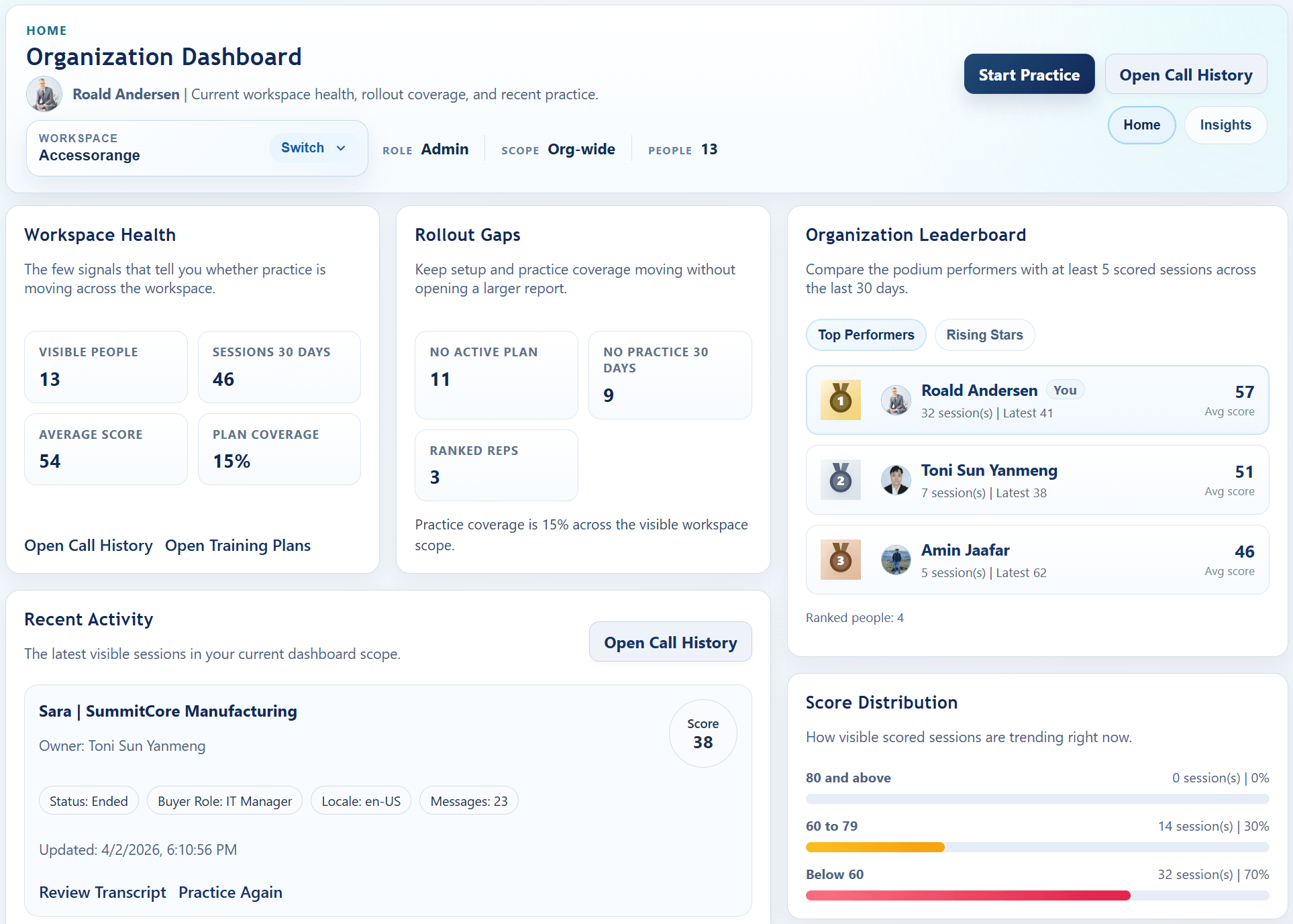
ConvinceIQ rollout dashboard showing workspace health, rollout gaps, leaderboard, recent activity, and score distribution.

Rollout dashboard with practice coverage, recent activity, coaching gaps, and team-level readiness signal.

Next Step

See the ConvinceIQ workflow using your team’s own sales motion

A focused demo can walk through setup, practice, review, and rollout with your real coaching priorities in mind.