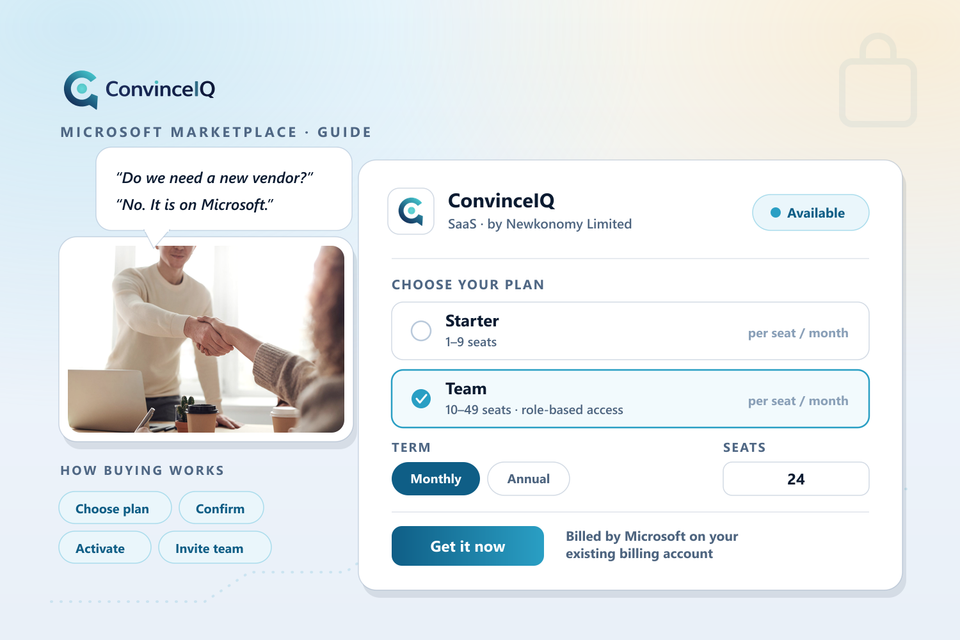
ConvinceIQ is now available on the Microsoft Marketplace. Teams can buy it in a few minutes, on the Microsoft billing account they already have, and run their first practice calls the same day.
This guide covers what the listing offers, how buying and activation work, and how billing, seats, and cancellation are handled once your team is up and running.
What a Marketplace listing changes for your procurement
Most teams do not stall on whether a tool is worth it. They stall on what comes after the decision — a new vendor record, a security questionnaire, a fresh contract to negotiate, a purchase order, and a finance approval that sits in a queue. Software that everyone agreed was a good idea quietly dies in that queue all the time.
Buying through the Microsoft Marketplace removes most of it. ConvinceIQ is a transactable offer, which means the purchase runs through Microsoft rather than through us. The charge lands on the Microsoft invoice your organisation already receives, and the offer is made under Microsoft's Standard Contract — terms many organisations have already reviewed and accepted for Marketplace purchases. For a lot of companies that turns a procurement cycle into a single approval.
It is also a lower-commitment way to begin. A monthly plan lets a team try ConvinceIQ properly, with real reps and live deals, and move to an annual term once the value is obvious.
What you get
ConvinceIQ is an AI sales roleplay and coaching platform. Reps hold live, spoken practice calls with AI buyer personas built around your products, your market, and the objections your buyers actually raise. The buyer pushes back, asks for proof, and only moves the conversation forward when its criteria have been credibly addressed.
Every session is transcribed and scored across six dimensions — discovery, value proposition, objection handling, call structure, next steps, and tone — alongside a buyer-belief signal that shows whether the buyer was actually convinced rather than merely polite. Written feedback arrives as soon as the call ends.
Managers coach from what was said rather than from an impression. Call History keeps ended sessions available for review, and Team Insights group activity and score trends by rep. Teams selling across markets can practise in 19 supported languages, with live English translation so one manager can still review a session held in another language.
Plans available on the Marketplace
The listing carries two self-serve plans. Both are priced per seat, and both are available on a monthly or an annual term.
- Starter — for individuals and small teams getting started, up to 9 seats.
- Team — for 10 to 49 seats, adding role-based access and Team Insights for managers.
Team costs less per seat than Starter, so it is worth choosing as soon as your rollout reaches ten people. Current per-seat pricing for both plans is shown on the listing and on our pricing page. Rollouts above 49 seats are handled through a private offer.
How to buy ConvinceIQ on the Microsoft Marketplace
The purchase itself takes a few minutes.
- Open the ConvinceIQ listing on the Microsoft Marketplace.
- Select Get it now and sign in with your work Microsoft account.
- Choose Starter or Team, a monthly or annual term, and the number of seats you need.
- Confirm the purchase. Microsoft takes payment and adds the subscription to your existing billing account.
- Select Configure account. This hands you over to ConvinceIQ to finish setup.
- Name your workspace, or attach the subscription to a ConvinceIQ workspace you already have, then confirm.
- Invite your reps and assign their seats.
If you close the browser before finishing setup, nothing is lost. Reopen the subscription from the Azure portal or the Microsoft 365 admin center and select Configure account again.
Private offers for larger or custom rollouts
Teams above 49 seats, multi-region rollouts, and anyone who needs different commercial terms can use Request private offer on the listing. We agree the terms with you directly, Microsoft issues a private offer against your account, and you accept it the same way as any other Marketplace purchase — so the procurement advantages still apply.
This is also the route for enterprise requirements such as custom scorecards, bringing in existing call recordings, and integration work.
Security and your data
Practice calls contain your positioning, your objection handling, and how your team talks about competitors. We treat that as confidential material. Our Enterprise Readiness page sets out how ConvinceIQ handles data, access control, and hosting, and it is the right starting point for a security review.
Frequently asked questions
How is ConvinceIQ billed when I buy through the Marketplace?
Microsoft bills you. The subscription appears on the same invoice as your other Microsoft purchases, on the term you chose at purchase — monthly or annual. ConvinceIQ never takes your payment details.
Can I change the number of seats later?
Yes. Change the quantity on the subscription from the Azure portal or the Microsoft 365 admin center and your ConvinceIQ workspace updates to match. Moving between Starter and Team works the same way: change the plan on the subscription.
How do I cancel?
Cancel the subscription from the Azure portal or the Microsoft 365 admin center. Microsoft notifies ConvinceIQ automatically, and your workspace is updated without you needing to contact us separately.
Does buying through Microsoft change the product?
No. It is the same ConvinceIQ, with the same features on each plan. Only the purchase and billing path is different.
Is ConvinceIQ available in my country?
The offer is sold in the markets Microsoft Marketplace supports for it. The listing page shows availability for your account before you buy.
How to get started
If your organisation already buys through Microsoft, the Marketplace is the fastest route in: choose a plan, confirm, and your team can be practising today.
You can find the offer on the Microsoft Marketplace, or book a walkthrough first if you would rather see it before you buy.