ConvinceIQ Power Automate Connector: Trigger Sales Practice from Your CRM
ConvinceIQ now has a connector for Microsoft Power Automate. It lets you assign sales practice straight from your CRM, onboard new reps without manual setup, and send practice scores to Teams, Excel and Power BI — all without writing code or managing API keys.
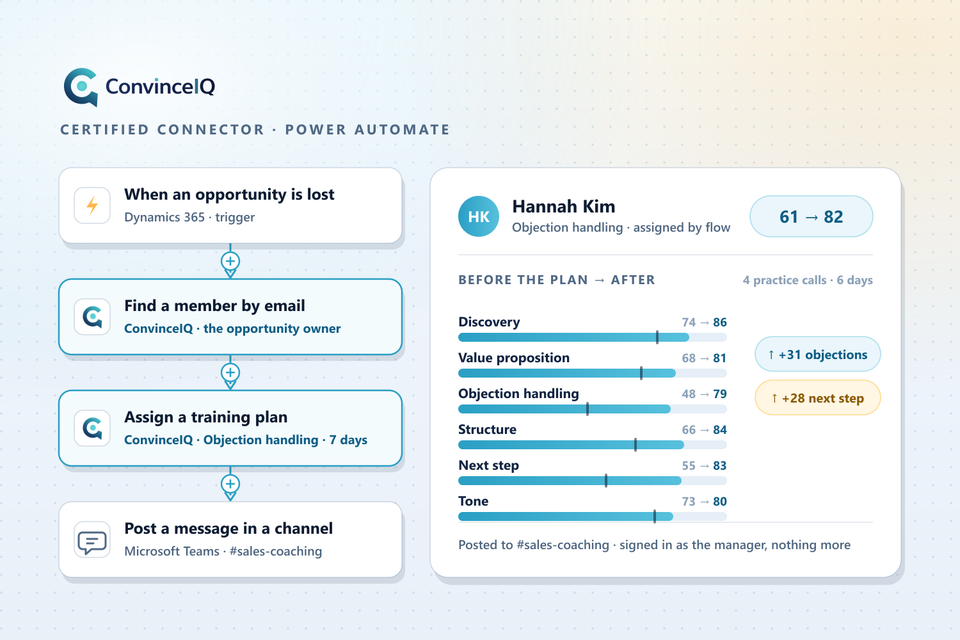
A deal is marked lost in Dynamics 365. The flow finds the rep in ConvinceIQ, assigns an objection-handling plan with a due date, and the rep practises while the conversation is still fresh. A new hire appears in your HR system. The flow invites them, then assigns the onboarding plan once they join. The 30-day leaderboard posts to a Teams channel every Monday. Finished sessions land in a Power BI dataset overnight. None of this needs anyone to remember to do it.
The connector is Microsoft-certified, included on every ConvinceIQ plan, and works in Power Automate, Power Apps, Azure Logic Apps and Copilot Studio. You sign in with your Microsoft work account — no API keys to create or store. Microsoft is rolling it out region by region, so if you do not see ConvinceIQ in the connector list yet, check again in a few days.
Five things you can automate
1. Practice after a lost deal
An opportunity closes as lost in Dynamics 365 or another CRM. The flow finds the rep by email, assigns an objection-handling plan with a due date, and you see the scored result at your next review.
2. Rep onboarding
A new team member appears in your HR system or Microsoft Entra ID. The flow invites them to ConvinceIQ and assigns the onboarding plan once they have joined. No one has to remember to set it up.
3. Weekly leaderboard in Teams
Every Monday the flow posts the 30-day leaderboard to a Teams channel: top performers and rising stars. Consistent practice gets noticed.
4. Scores in your dashboards
Every night the flow copies finished sessions and scores to Excel, SharePoint or Power BI. Practice data sits next to pipeline and quota in the reports leadership already reads.
5. A Copilot Studio agent
Add the ConvinceIQ actions to a Copilot Studio agent. A manager asks “How did my team do this week?” and gets an answer from live data, scoped to their team.
What you need
- A ConvinceIQ workspace on any plan: Starter, Team or Enterprise.
- A Microsoft work or school account for signing in. Personal Microsoft accounts and Google sign-in do not work with the connector.
- Power Automate Premium for the person who builds the flow. Microsoft releases every newly certified connector as Premium.
- A manager or admin role for flows that find members, invite people or assign plans. Reading your own sessions and the leaderboard works for every member.
- Team or Enterprise to assign training plans or invite managers. Everything else works on Starter.
How to connect
- Add an action to your flow and search for ConvinceIQ.
- Sign in with your Microsoft work or school account.
- Pick your Workspace in each action.
- Run Get my membership first — it confirms the connection and shows the role the flow will act with.
If sign-in shows “Need admin approval”, ask your Microsoft Entra administrator to grant consent for the ConvinceIQ connector once. After that, everyone in your organisation can connect.
Security
The connector signs in as you. ConvinceIQ applies your role and team to every request — a manager's flow sees that manager's team, an admin's flow sees the workspace. No API keys. Details on the security page and in the privacy policy.
All seven actions
Get my membership · List practice sessions · Get a session (transcript and scores) · Get the leaderboard · Find a member by email · Invite a person · Assign a training plan.
No triggers yet — a flow that reacts to new results runs on a schedule. The connector guide explains every action, input and error, and Microsoft's reference page lists them too.
New to ConvinceIQ? Book a demo and we will show you the practice, scoring and coaching that these flows build on.
Frequently Asked Questions
Do I need an Enterprise plan to use the connector?
No. It is included on Starter, Team and Enterprise. Assigning training plans and inviting managers need Team or Enterprise.
Does the connector need a Power Automate Premium licence?
Yes, for the person who builds the flow. People who only receive what the flow produces — a Teams post, a report — do not need one.
Can a rep use it, or only managers?
Anyone with a ConvinceIQ account can read their own sessions, their membership and the leaderboard. Finding members, inviting people and assigning plans need a manager or admin role.
Can a flow start when a practice session finishes?
Not yet. Run a scheduled flow that lists recent sessions and handles the new ones.
Does it work with Google sign-in?
No. The connector uses a Microsoft work or school account, so that is how you need to sign in to ConvinceIQ.